Summary
This page shows the previous matches that have been played.
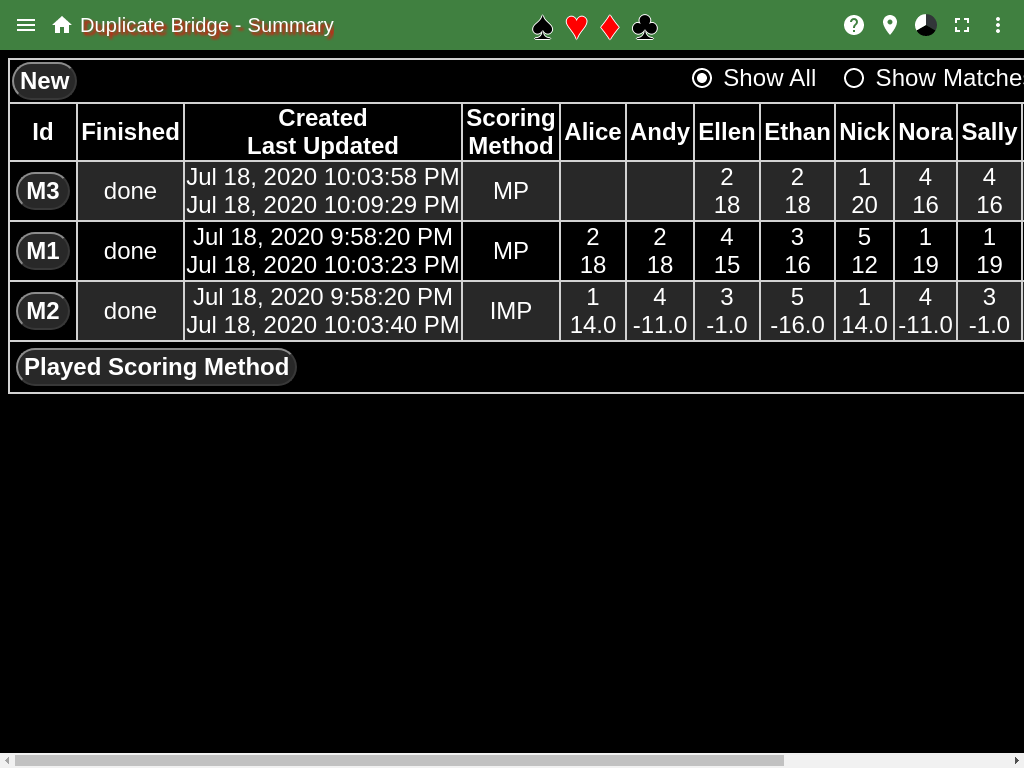
For each match the players are identified in the table that played the match. Each entry has two number, the top number is the place the team came in, the lower number is the number of Match Points the team earned in the match.
The scoring method indicates which scoring method was used when playing the duplicate match. MP indicates Match Points, while IMP indicates International Match Points.
Clicking the New button will create a new duplicate match. It will create a match with MP scoring. The scoring method can be changed before any boards have been played by going to the director’s scoreboard page.
Prior to hitting the new button, pairing suggestions can be obtained. See below
Application Bar
At the top left there are two icons that can be clicked. The left one brings up a menu for the page, the other is an icon of a house, this brings up the home page for the BridgeScorer application.
The Home button returns to the home page
Menu
The Suggest Pairs menu item shows the suggestion page that allows you to enter 8 names and using the match history it will suggest the teams for the next match.
The Show All menu item will toggle between showing 10 matches and all matches. The presence of a checkmark indicates all (present) or 10 (absent).
The Statistics menu item will show the statistics page that shows a bunch of statistics about all the played matches.
The Test menu item creates a test duplicate match with a couple of scores entered.
The Select For Print menu item changes the page to allow selecting matches that you want to print. Once all the matches have been selected, just print the browser page.
The BoardSets menu item shows a page that displays the board sets that are known by the application. The standard boards are the normal boards used in tournaments.
The Movements menu item shows all the movements that the application knows about. The most of the movements came from http://www.bridgeguys.com/Conventions/movements_for_bridge.html
The Summary menu item will show the summary page which lists all duplicate matches that have been played, which is this page.
The Beep menu item is used to enable/disable a beep when a round has been completed at all tables. The presence of the checkmark indicates whether the beep is enabled (present) or disabled (absent). The default is disabled.
Button at Bottom
The Played Scoring Method button, which can also be Match Points or International Match Points identifies how the scores are displayed in the summary page. This will not change the scoring method of the match, only show what the score would be with an alternate scoring method.