Scoreboard
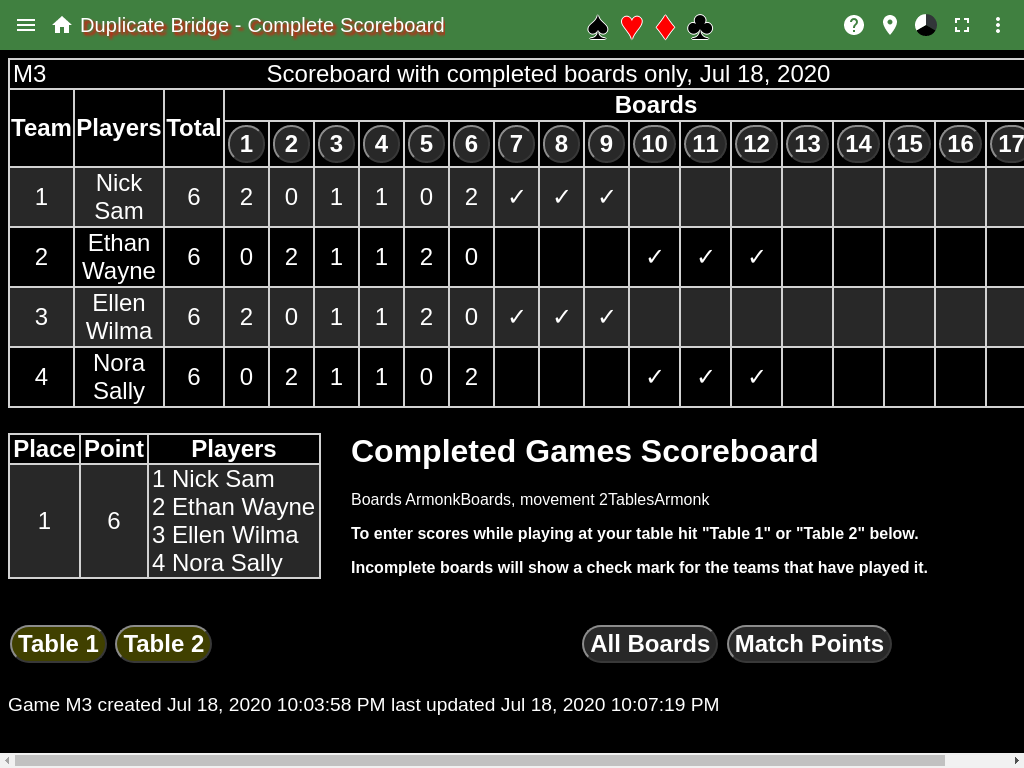
This shows the current results of the duplicate match. A row in the table is a team. A column, after the third column is a board. Hitting one of the buttons with numbers in the header of the first table will show that board page.
The Scoreboard Table will show
- blank - if a team still needs to play the board.
- ✓ - if a team has played the board, and not everyone has played the board.
- ✗ - if the team does not play the board (happens when there is an odd number of teams). Not shown on the screen shot.
- A number - the points the team has earned.
The totals column shows the points that each team has earned.
The second table shows what place each team came in. The first column shows the place the team is currently in, the second is the points that the team has earn from completed boards. The last column is the team number and player names. This example shows only one row since all teams have the same number of points.
The light yellow indicates the most likely button that should be hit.
Scoring at a Table
The buttons with the labels Table n, where n is 1, 2, … are used to start scoring at a table. Hit the button for the table where you are playing.
Other buttons
The All Boards button shows a page that has all the board score sheets.
The Match Points button, which can also be Played Scoring Method or International Match Points identifies how the scores are displayed in the scoreboard page. This will not change the scoring method of the match, only show what the score would be with an alternate scoring method.
The Set Scoring Method button will only be shown if no hands have been played. This is used to set the scoring method of the match. First have the correct scoring method be shown, either Match Points or International Match Points, then hit the Set Scoring Method button. The default is Match Points.
Menu
The Director’s Scoreboard menu item shows the director’s scoreboard. This scoreboard is allowed to see all results, even when a board hasn’t been played by all teams. This should only be used by the director of the duplicate match to resolve issues.
The For Print menu item shows a page that where matches can be selected and printed.
The BoardSet menu item shows the board sets that are being used for this match.
The Tables menu item shows the table cards for all tables.
The Table n menu items shows the table card for the specified table.
The Summary menu item will show the summary page which lists all duplicate matches that have been played.
The Beep menu item is used to enable/disable a beep when a round has been completed at all tables. The color of the checkmark indicates whether the beep is enabled (black) or disabled (gray). The default is disabled.